◆Emergency stock management for organizations

Do not leave emergency-stock expiry management to one person.

Manage each location as a group. Share the same inventory and expiry dates in the web app and the iOS / Android apps.
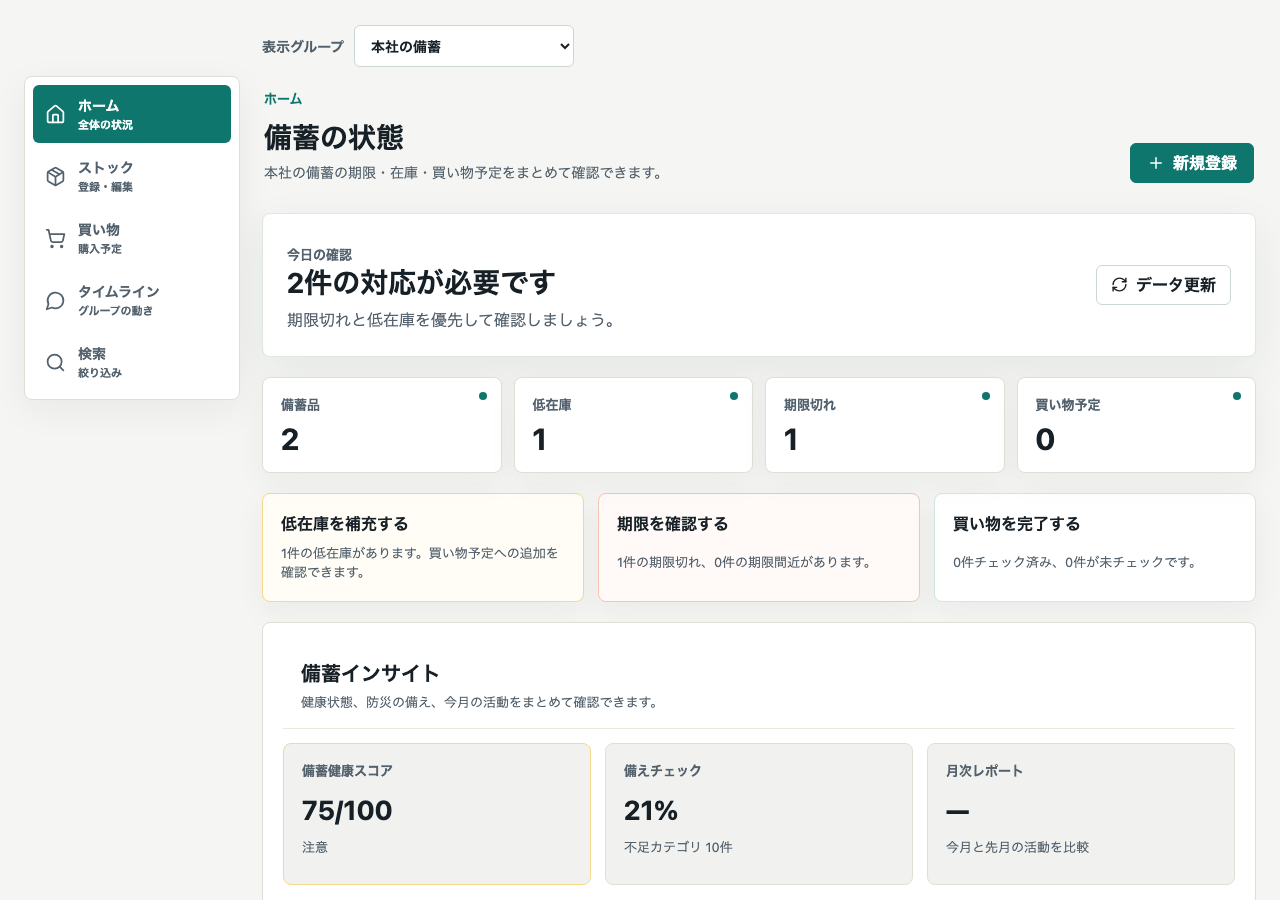
✓Readiness checks by group✓Mobile on-site inventory✓CSV import and export
Web home showing stock and readiness for the head office group
Web home with sample data, shown in Japanese. One selected group is displayed. Select the image to enlarge it.

Does your stock management look like this?

Spreadsheets and paper records eventually miss something.

!

Water expires unnoticed

Different expiry dates make rotation difficult, leaving expired food and water at the back of shelves.

!

Records disappear when staff change

Records kept on personal computers stop being updated when staff transfer or leave.

!

Every audit becomes a major inventory exercise

Teams recount every location and manually prepare reports before inspections.

Nokoris for Business turns person-dependent work into a repeatable process.

Share stock, expiry dates, and shopping plans in the web and mobile apps. Switch groups to check each location.

FEATURES

Four essentials for stock management.

01

Switch groups to check each location

The home screen shows stock, expiry dates, shopping plans, and readiness for one selected group.

  • Register locations as groups and switch between them
  • Organize down to shelf level
  • Shared access supports staff handovers
⌂

Switch groups to check each location

The home screen shows stock, expiry dates, shopping plans, and readiness for one selected group.

02

Assess readiness for your people and days

Enter the number of people and required days. Shortages are calculated by item and shown clearly.

  • Set people and days for each group
  • Check shortages by category
  • Track improvements in monthly reports
%

Assess readiness for your people and days

Enter the number of people and required days. Shortages are calculated by item and shown clearly.

03

Complete on-site inventory in the mobile app

Scan barcodes at the shelf and update quantity, expiry, and location immediately.

  • On-site work with iOS and Android
  • Add photos, categories, and storage locations
  • Keep the same inventory when staff change
▣

Complete on-site inventory in the mobile app

Scan barcodes at the shelf and update quantity, expiry, and location immediately.

04

Import and export stock records as CSV

Import existing records and export the selected group as CSV. Format the exported data as needed for internal reports.

  • CSV import and export
  • Export the selected group’s stock records
  • Import existing ledger data by CSV
CSV

Import and export stock records as CSV

Import existing records and export the selected group as CSV. Format the exported data as needed for internal reports.

Current service: switch groups to check each location. A combined cross-location dashboard and expiry emails to staff are not included. Expiry alerts use mobile Push and Web Push in supported browsers; notification permission and device settings are required.

How it works

See whether it fits your organization in 15 minutes.

1

Request information

Request information or a demo of the actual screens through this form.

2

Online briefing

See the actual screens and discuss locations, people, and your current records in a 15-minute briefing.

3

Try the web app

Sign in with the same mobile account to try inventory management on the free plan. Paid-plan trials are for eligible users only.

4

Subscribe

If you decide to continue, subscribe to the standard Business plan.

PRICING

Business plan pricing

Manage stockpiles across up to 10 groups with the standard Business plan.

Nokoris Business

Emergency stock management for multiple locations and organizations

View at checkout
View at checkout

Monthly ¥1,980 (tax confirmed at checkout) / Annual ¥19,800 (tax confirmed at checkout)

Annual plans are billed for one year at a time. Monthly and annual plans renew automatically.

Eligible web users who have never purchased a paid plan receive one 30-day trial per account. A payment method is required. You will be charged after the trial unless you cancel during it. Confirm final eligibility and charges at checkout. Mobile trial terms are shown by each store.

Open web pricing and signup → · Commercial transactions disclosure

  • Manage up to 10 location groups
  • Shared members, categories, and storage locations
  • Expiry alerts, stock templates, and monthly reports
  • CSV import and export

Request information through our dedicated form.

Request information or a demo of the actual screens. Send the number of locations, people, and your current record process. We will email material and briefing times.

  • Used only to respond to this business inquiry
  • A representative reviews it and replies by email
  • Early-stage questions are welcome

Information request form

Only three fields are required. You can send it before the details are finalized.

FAQ

Frequently asked questions

Is there a web dashboard?+
The web app is available. Open the web app and sign in with the same account as the mobile apps. Home shows one selected group; switch groups to check each location. A combined cross-location dashboard is not included in the current service.
Can we migrate an existing Excel ledger?+
CSV import and export are supported. You can organize the fields in your current ledger and use them for initial registration.
How are security and permissions handled?+
Sign in with the same mobile account and share data within your groups. Actions depend on group permissions. Review members and permissions when staff change.
What are the contract and cancellation terms?+
Monthly and annual plans renew automatically. Annual plans are billed for one year at a time. Cancel in the purchase provider’s management screen before the next renewal; access continues until expiry. Partial refunds are generally unavailable. Contact us for invoice contracts.
Can we pay by invoice or bank transfer?+
For corporate invoice or bank-transfer payment, use this form with your organization name, group count, and requested payment terms. We will confirm availability, due dates, and contract terms and guide you after individual agreement. This is separate from regular web checkout. Confirm qualified-invoice availability in advance.
Can we export data after adoption?+
Inventory ledgers and upcoming expiries can be exported as CSV. You can format the exported data as needed for audits, internal reports, or integrations.

Turn person-dependent stock management into a process today.

The material is free. Review it first and decide whether Nokoris fits your organization.

Request information (free)→